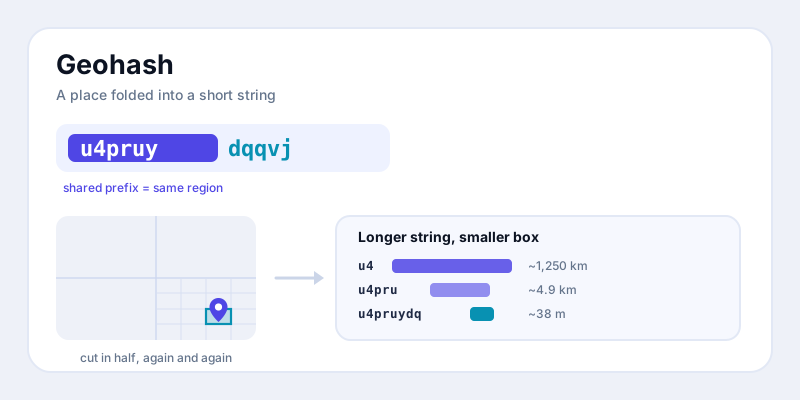
Sooner or later you bump into one: a short, cryptic string like u4pruydqqvj in a URL, a database column, or an API response that is clearly about a place but looks nothing like latitude and longitude. That's a geohash — a way to fold a pair of coordinates into a single text code. Here's what a geohash is in plain English: the grid-cutting idea behind it, why the codes use letters and digits, the near-magic property that nearby places share their opening characters, and where you'll run into them.
What a geohash is, in one idea
A geohash is a way of describing a rectangle on the Earth's surface with a single string of letters and numbers. Instead of saying "latitude 57.649, longitude 10.407," you say "u4pruydqqvj," and that string stands for a small box on the map containing that point. The longer the string, the smaller and more precise the box. The shorter the string, the bigger the box.
That's the whole concept. A geohash doesn't point at an exact dot the way raw coordinates do — it names a cell, a tile of the world. A point isn't really "at" a geohash; it falls inside the box that the geohash describes. This sounds like a downside, but it turns out to be the source of everything useful about the format, as you'll see below.
How the grid is built: cut in half, then half again
The trick behind a geohash is repeated halving. Start with the whole planet as one giant rectangle. Now ask a yes/no question: is our point in the eastern half or the western half? That single answer cuts the world in two. Then ask the same about the surviving half, then the half of that, and so on. Each answer is one bit of information, and each one shrinks the box that could contain your point.
Geohashing alternates between the two coordinates as it cuts. One step splits the longitude range (left/right), the next step splits the latitude range (bottom/top), back and forth. After enough rounds of "left or right, top or bottom," you've zoomed from the whole Earth down to a box just a few meters across — purely by answering a string of yes/no questions.
If you've read our explainer on Plus Codes, this will feel familiar: both formats subdivide a grid into ever-smaller cells. The difference is in how they cut and encode, which is what the next section is about.
Why the codes use Base32 (those odd letters)
All those yes/no answers are just bits — ones and zeros. A long string of bits is awkward for people to read or type, so geohashing packs them into a more compact alphabet. Every 5 bits (five yes/no answers) become a single character, and there are exactly 2 to the power of 5 = 32 possible combinations of 5 bits. So you need an alphabet of 32 symbols. That's where the name Base32 comes from.
Geohash uses a specific 32-character alphabet: the digits 0-9 and most lowercase letters, but with a, i, l, and o left out (they're easy to confuse with other characters when reading or copying). The result is the friendly-looking jumble you recognize as a geohash. There's nothing meaningful about any individual letter — each character is simply shorthand for five of those left/right, top/bottom decisions.
One practical upshot: because each character encodes exactly 5 bits, adding a character makes the box dramatically smaller, and the box alternates between getting wider-then-shorter and taller-then-narrower as the length grows. That's why geohash cells aren't always square — at most lengths they're slightly rectangular.
The killer feature: nearby places share a prefix
Here's the property that makes geohashes special. Because the code is built from the outside in — big cuts first, fine cuts last — two points that are close together tend to start with the same characters. The opening characters describe the large region both points sit in; only the trailing characters differ to pin down the exact spot.
Think of it like a postal hierarchy baked into the string. Two cafes on the same block might have geohashes that agree for the first eight characters and only differ at the very end. Two cities in the same country might agree for the first two or three. The shared opening run — the prefix — is a direct readout of how close two places are.
This lets you answer "are these two things near each other?" with a plain text comparison, no trigonometry required. Want everything roughly inside a region? Search for all geohashes that start with a given prefix, and a database can do that with an ordinary index, the same way it finds words that start with the same letters. That single idea is why geohashes show up all over location software.
One caveat: the prefix trick is a strong hint, not a guarantee. Two points can sit right next to each other yet land on opposite sides of a grid line, and then their prefixes diverge much earlier than their real distance suggests. Production systems work around this by also checking the eight neighboring cells. So treat a shared prefix as "very likely close," and lean on a real distance calculation when you need the exact answer.
Precision by length: how long is long enough?
Because each added character refines the box, geohash length maps directly to precision. You can dial in exactly as much detail as you need and no more. Here's the rough size of the cell at each length (sizes are approximate and vary with latitude):
| Geohash length | Cell size (approx.) | Good for |
|---|---|---|
| 1 | ~5,000 km | Continent-scale region |
| 2 | ~1,250 km | Large country / state cluster |
| 3 | ~156 km | Region or metro area |
| 4 | ~39 km | City |
| 5 | ~4.9 km | Town / district |
| 6 | ~1.2 km | Neighborhood |
| 7 | ~153 m | A block or two |
| 8 | ~38 m | A building |
| 9 | ~4.8 m | A doorway / parking space |
| 10 | ~1.2 m | Sub-meter pinpoint |
The pattern is easy to remember: every two characters shrinks the cell by roughly a factor of 30 to 40. Six characters gets you to neighborhood level; eight or nine is plenty for almost any everyday "where is this thing" purpose. There's rarely a reason to go past length 10 — at that point you're describing a box smaller than your phone's own location accuracy.
Geohash vs coordinates: when to reach for each
A geohash and a latitude/longitude pair describe the same reality, so why have both? They're tuned for different jobs.
- Coordinates are for precision and math. If you need the exact point, want to compute distance or bearing, or have to feed a mapping engine, raw lat/long is the right tool. It carries no built-in cell size and doesn't round your location into a box.
- Geohashes are for grouping, searching, and storing. The single-string format is easy to index, easy to truncate to a chosen precision, and the prefix property makes "what's nearby" cheap. They're also tidy: one short field instead of two floating-point numbers.
- Geohashes double as a privacy dial. Because chopping characters off the end widens the box, you can deliberately publish a 4- or 5-character geohash to share "somewhere in this town" without revealing the exact address — a coarse, honest blur.
In practice the two live side by side. Apps usually store true coordinates as the source of truth and a geohash alongside them as a fast index for proximity lookups. If you want to see this duality directly, our coordinate converter turns a lat/long pair into other formats, and you can compare the family of grid-style codes in coordinate formats explained.
Where you'll actually meet geohashes
Geohashes are mostly invisible plumbing, but they're everywhere location data is handled at scale:
- Proximity search. "Find drivers / shops / friends near me" is the classic case. Compute the user's geohash, look up everything sharing that prefix (plus neighboring cells), and you've narrowed millions of rows to a handful without scanning the whole table.
- Caching and tiling. Services cache results — weather, traffic, search — by geohash cell, so everyone in the same box reuses one computed answer instead of recomputing per point.
- Sharding and clustering. Map apps group dense clusters of pins by truncating geohashes; databases spread location data across servers using the prefix as a natural key.
- Compact identifiers. A geohash is a single URL-safe token, so it's handy for short links and IDs that need to encode a place.
The next time you spot a string like gcpvj0duq in an app or an API, you'll know exactly what it is: a place, folded into text, with its rough neighborhood readable right there in the opening characters.
Try it yourself
The fastest way to make geohashes click is to start from your own position and watch how length changes the box. Grab your latitude and longitude with the what-are-my-coordinates tool, then explore the related grid-based formats — Plus Codes and the coordinate converter. Once "cut the grid in half, encode in Base32, read the prefix" sinks in, those cryptic strings stop looking like noise.