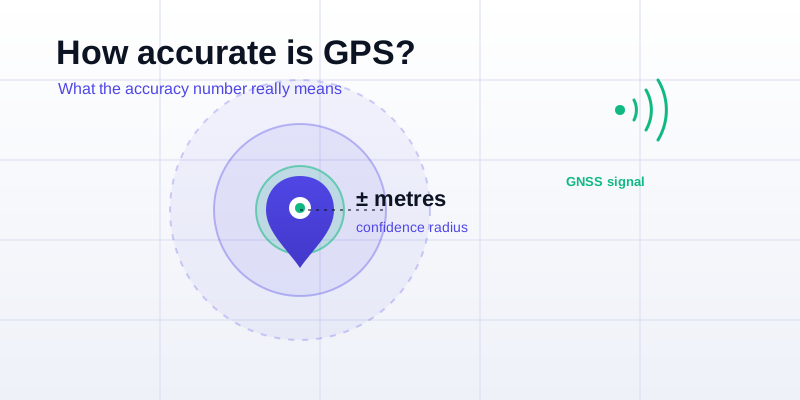
Your phone shows a blue dot and, often, a faint circle around it. That circle is the part most people ignore — yet it's the honest one, your phone admitting "I think you're here, give or take this much." So how accurate is GPS, really? Under open sky a modern phone usually places you within about 3 to 5 meters, but the more useful answer is learning to read that accuracy number instead of trusting the dot blindly. Here's what the ± metres means, what makes it worse, and how to pull a tighter, more trustworthy fix.
What the ± accuracy number actually means
When an app reports something like "accurate to ±8 m," it is not promising you are exactly 8 meters from the dot. It is giving a confidence estimate: the true position is probably somewhere inside a circle of that radius. On most phones this figure is a 68% confidence value — roughly, there's about a two-in-three chance you're inside the circle, and a real chance you're a bit outside it. It's a statistical estimate the receiver calculates from how cleanly it's hearing the satellites, not a measured error.
Two things follow. First, the number changes second by second as conditions shift — watch it and you'll see it breathe. Second, a small circle means a confident fix and a big circle means "don't trust the exact spot yet." The radius is the clearest signal your phone gives you about location quality, which is why the GPS accuracy test puts it front and center.
Typical accuracy, condition by condition
There is no one accuracy figure for "GPS" — it depends almost entirely on what's between you and the sky. Here's what to expect in the real world:
| Where you are | Typical horizontal accuracy |
|---|---|
| Open field, beach, clear sky | 3-5 m (10-16 ft) |
| Suburban street, light tree cover | 5-10 m (16-33 ft) |
| Dense city, tall buildings ("urban canyon") | 10-30 m+ (33-100 ft+) |
| Deep forest or canyon | 10-20 m, often unstable |
| Indoors or underground | Very poor; usually Wi-Fi-estimated, not satellite |
| Dual-frequency phone, open sky | Can approach 1-2 m |
Notice the spread. The same phone that nails your spot to a few meters in a park can be 30 meters off downtown. The hardware didn't change — the sky view did.
What degrades a GPS fix
GPS works by timing radio signals from satellites your phone can "see." Anything that blocks, weakens, or bounces those signals widens the accuracy circle. The main culprits:
- Blocked sky. Buildings, dense foliage, canyon walls, tunnels, and even your own body between the phone and a satellite all cut the number of signals available. Fewer satellites locked means a weaker, looser fix.
- Multipath in cities. Signals ricochet off glass and concrete before reaching you, so the phone times a longer, reflected path and places you across the street. This is the classic urban-canyon error and the hardest one to fix.
- Indoors. Roofs and walls absorb the faint satellite signal almost completely. What you see indoors is usually Wi-Fi or cell-tower positioning wearing a GPS costume — handy, but coarse.
- A cold start. A phone that's been off, in airplane mode, or moved hundreds of miles needs a minute to download fresh satellite data. The first fix is rough; it tightens as data arrives.
- Atmosphere and timing. The ionosphere subtly delays signals, and tiny satellite-clock errors add up. These are small, but they're why even a perfect open-sky fix isn't centimeter-perfect.
Why dual-frequency GNSS is a big deal
First, two quick terms. GNSS is the umbrella name for all the satellite systems — the U.S. GPS plus Europe's Galileo, Russia's GLONASS, China's BeiDou, and Japan's QZSS. Your phone listens to several at once, and more satellites in view means a faster, steadier fix. Dual-frequency means the receiver listens on two radio bands at the same time (the older L1 and the newer L5).
That second band matters because L5 is broadcast on a stronger, more modern signal that's far better at being recognized when it has bounced. A dual-frequency phone can spot and discard reflected signals — exactly the multipath problem that ruins accuracy in cities. The payoff: in the open, dual-frequency phones can approach 1-2 meters, and in town they stay sensible where older phones wander. Most flagship phones from the last few years are dual-frequency; many budget models still aren't, which is a real reason two phones standing side by side can disagree.
How to get a tighter, more trustworthy fix
Most accuracy complaints clear up in a minute or two. Try these in order:
- Get a clear view of the sky. This is the single biggest lever. Step out from under awnings, walls, and tree cover, and hold the phone face-up rather than pressed to your body.
- Wait a few seconds. Accuracy tightens as the receiver locks more satellites. Watch the circle shrink and only trust the position once it settles.
- Turn on precise / high-accuracy location. Let the phone combine GPS, Wi-Fi, and mobile networks instead of satellites alone — it fixes faster and fills gaps near buildings.
- Stand still while it settles. A moving phone gives the receiver a harder problem; a few seconds of standing still produces a cleaner first reading.
- Restart location or the phone. Toggling location off and on, or a quick restart, clears stale satellite data and forces a fresh, healthier fix.
- Don't confuse heading with position. If the dot is right but the direction arrow points the wrong way, that's the compass — wave the phone in a figure-eight to recalibrate it.
One thing no setting can do is beat physics. Indoors, in a tunnel, or in a steel-and-glass canyon, accuracy will be limited no matter what — the move there is to step somewhere with more sky, not to keep tapping the screen.
Accuracy vs precision: reading your coordinates
Once you have a tight fix, the numbers carry that quality — or throw it away. Accuracy is how close you are to the true spot; precision is how many digits you write down. They're different, and it's easy to fake the second. As a rule of thumb, the fifth decimal place of a decimal-degree value is about a meter on the ground, so a reading like 40.74892 keeps roughly meter-level detail, while 40.75 rounds you to within a hundred meters or so.
The lesson: when you copy a position from the coordinates finder, keep enough decimal places to match the accuracy your phone actually achieved — and don't bother adding extra digits to a fix that was only good to 20 meters. Padding precision onto a loose fix is false confidence.
The bottom line: GPS is remarkably good — usually a few meters, and tightening every hardware generation — but it's an estimate, not a survey instrument. Read the accuracy circle, give the receiver open sky and a moment to settle, and you'll get the best your phone can deliver. See how your device is doing right now with the GPS accuracy test, then grab a clean reading with the what-are-my-coordinates tool.